

Native performance, real web UI
A Rust backend talking to your OS's own webview — no bundled Chromium runtime — so it starts instantly and stays light on memory, with a React 19 interface on top.
How it works
LimeFTP sits between your machine and the server, so every drag, sync, or edit happens in one dual-pane window instead of switching between two.

Both sides, one window
Saved connections in the sidebar, local and remote side by side — this is the real LimeFTP interface.
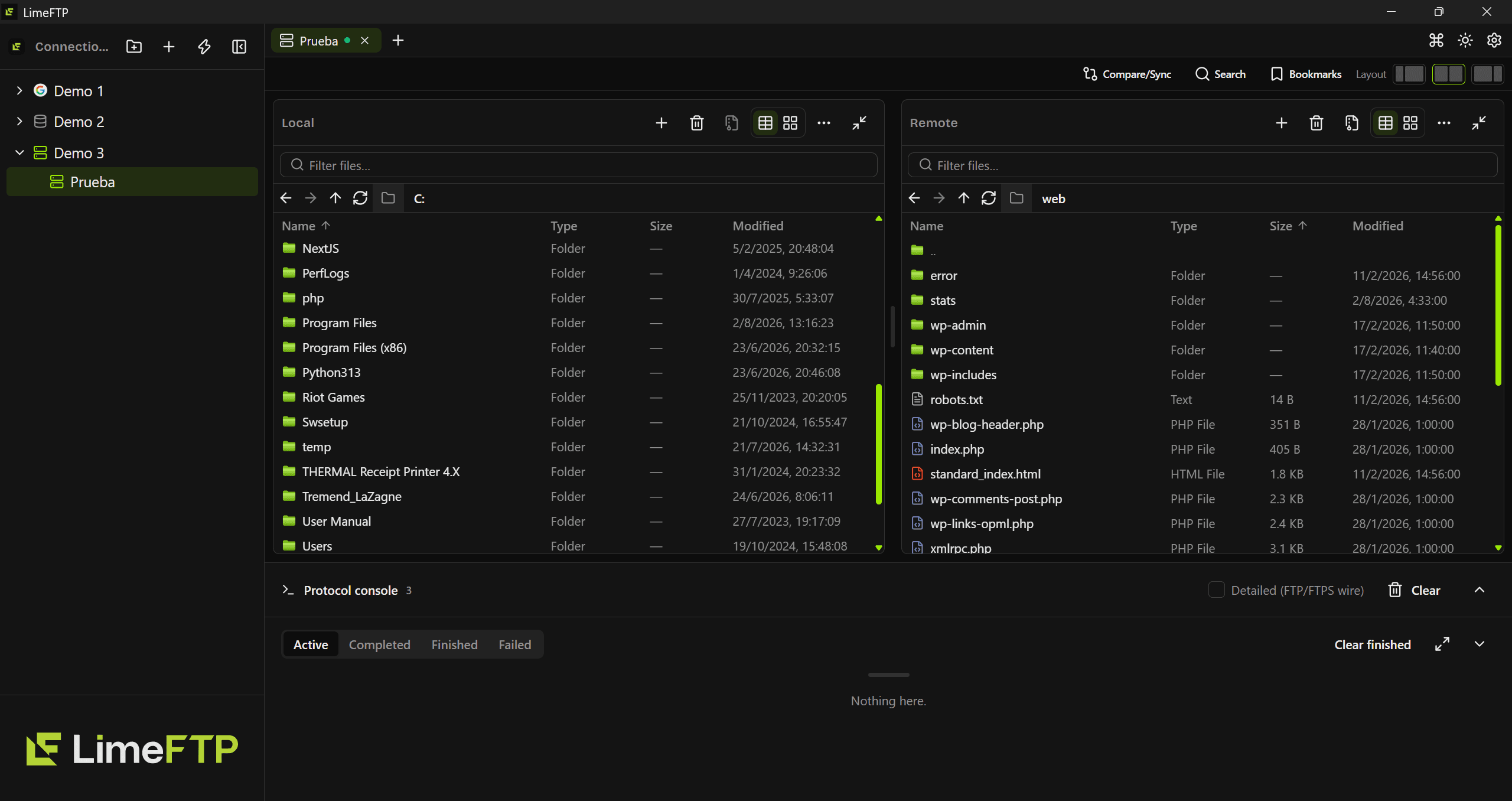
Real product screenshot — folder and site names shown are demo/generic, not client data.
Get the app
Every installer is signed and checked against the same release. Pick your platform.
What's inside
Every tab below is a real, shipped capability — not a roadmap promise.
Compare local and remote folders, then mirror or sync — newest file wins, or force one side to match the other.
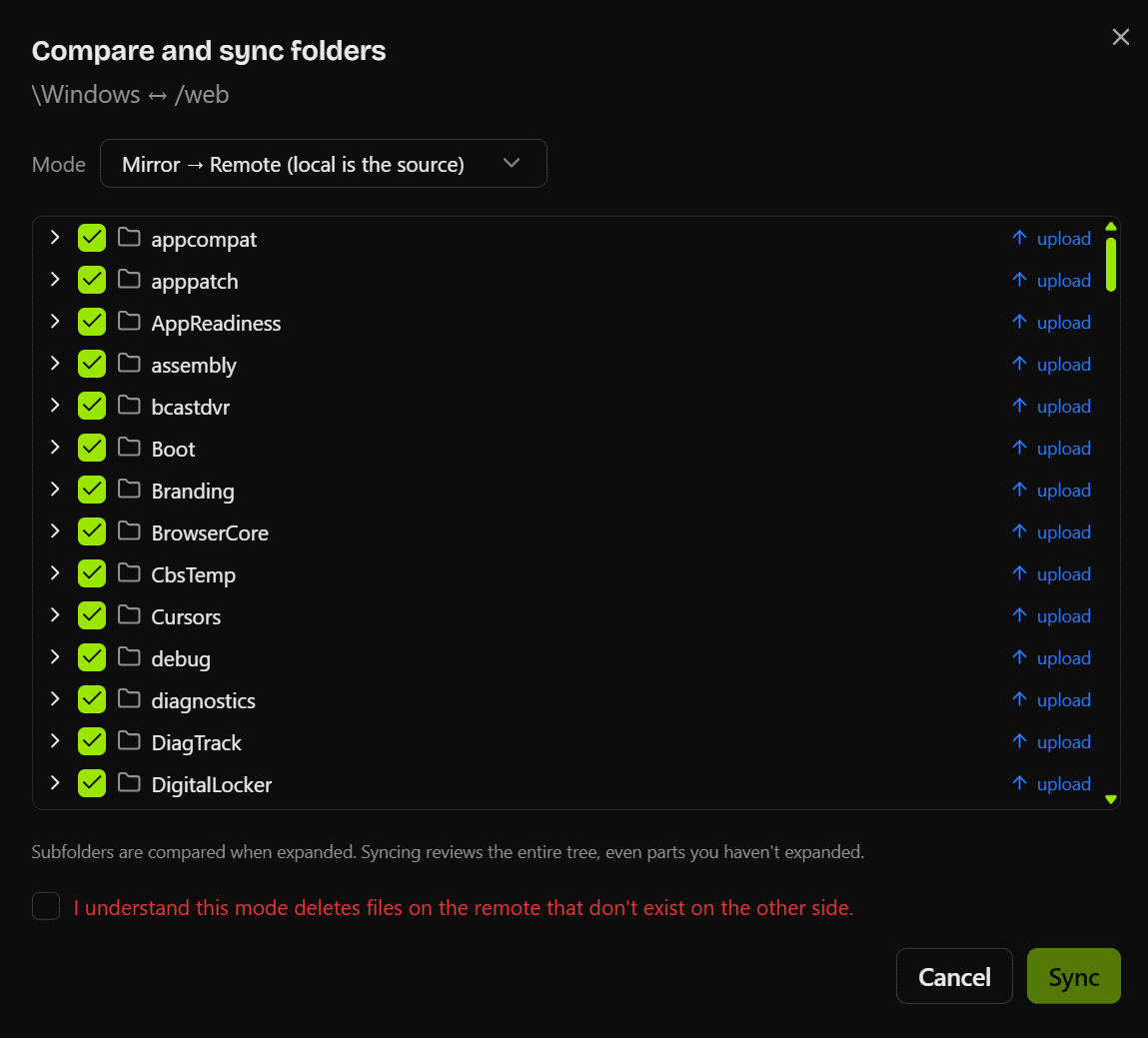
- Mirror local → remote, remote → local, or a two-way sync
- Every folder gets an upload/download action you can override per item
- Subfolders compare recursively, even ones you haven't expanded
- A deletion step requires an explicit "I understand" before it runs
Live while it works
Pause, resume, verify — every transfer reports back.
Regex bulk rename
Find/replace with regex capture groups and an auto-incrementing counter — preview every new name before committing.
IMG_0001.JPG
IMG_0002.JPG
IMG_0003.JPG
IMG_0004.JPG
IMG_0005.JPG
vacation-2024-001.jpg
vacation-2024-002.jpg
vacation-2024-003.jpg
vacation-2024-004.jpg
vacation-2024-005.jpg
Coming from FileZilla or WinSCP?
Import your sites in one click. Here's what's different once you're in.
One-click import
Bring in every saved site from FileZilla's Site Manager or WinSCP directly — LimeFTP reads their files, no retyping hosts, ports, or paths.
A real editor, not a shell-out
Preview and edit remote files with syntax highlighting in the same window, instead of waiting on an external editor to notice a change.
Regex bulk rename
Rename a whole selection at once — find/replace, regex capture groups, an auto-incrementing counter, and a live preview before you commit.
Lives in the tray
Close the window and big transfers keep running in the background — a notification tells you the moment they're done.
Dark-mode native
One consistent interface built for it from the start, not a stack of native OS dialog boxes standing in for real screens.
Signed, self-updating
Every installer is minisign-signed, and the app checks for and installs its own updates — no hunting for a new .exe by hand.
The importer reads FileZilla's sitemanager.xml or WinSCP's saved sessions directly on your machine — nothing leaves your computer, and you review every site before it's added.
| Feature | LimeFTP | FileZilla | WinSCP |
|---|---|---|---|
| One-click import from FileZilla/WinSCP | |||
| Built-in editor (no external app) | |||
| Regex bulk rename with live preview | |||
| Runs in the tray during transfers | |||
| Signed, self-updating installers |
Based on each app's default install — some rows are achievable via plugins or manual config on the others.
Questions
See it in action
Keep scrolling — the whole walkthrough plays as you go.
Everything behind one master password
Saved credentials live in an AES-256-GCM vault keyed with Argon2id — never loose in a plaintext config.
FTP, FTPS or SFTP — one form
Pick the protocol, drop in host and port. Save it once and it's a single click from the sidebar after that.
Even the favicon, fetched for you
Point it at the site's URL and LimeFTP pulls the icon down, so a long connection list stays scannable.
Edit remote files in place
Syntax highlighting and inline lint, saved straight back over the same connection. No download round-trip.
Find it without digging
Search recursively from any remote folder — every hit comes back with its full path, size and date.
Both machines, one window
Local on the left, remote on the right. Drag across and the protocol console traces every command it sends.
Arrange it however you read
Flip either pane between list and grid, bookmark the paths you live in, and reshape the split itself.
Permissions, spelled out
Size, location, symlink status and the full permission bits — flagged when the server's answer isn't one to trust.
Everything one shortcut away
Connect to a saved site, switch theme, run any command — without reaching for the mouse.
Tune it to your connection
A global speed limit, transfer-finished alerts, raw wire logging, and a built-in check for updates.
Bring your sites with you
Import straight from FileZilla or WinSCP, then export every folder and connection — saved passwords stay behind.